Documentation
Overview
Webskts.com is a WebSockets as a service provider, designed to be as simple as possible, and requiring no SDK or dependencies to use. Your backend sends messages to us over HTTP; your frontend clients receive them instantly over a persistent WebSocket connection. Messages flow from your backend to your clients. The one exception is client events: on presence channels, members can send small messages to each other.
Each account has a secret API key (for sending) and a connection id, the GUID (for connecting). Never share your secret API key or commit it in a repository.
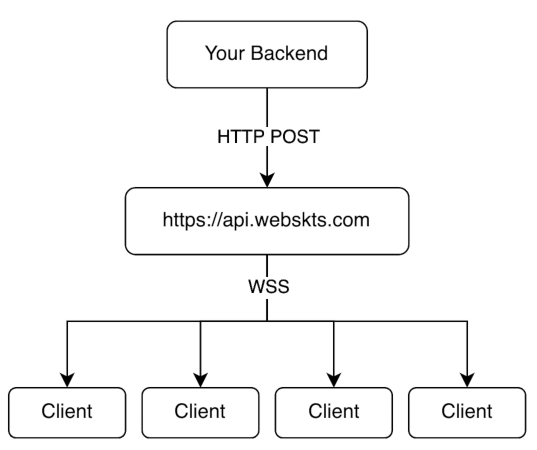
Usage
Anyone who has your connection id can listen to your public channels (see Securing your channels), so don't send sensitive data on them. For data only some people may see, use private channels, which need a token from your server. Keep messages small, too: the data of one message can be at most 256 KB.
The best practice is to send your clients an identifier relating to an update, and then have your clients fetch the relevant data from your own server, where you check who is asking.
Clients don't confirm messages to your server unless you use delivery receipts (Pro, Max, Enterprise), which tell your server how far each signed-in person has got on a channel. Without them, if a message must arrive, have the client confirm it to your server and resend when no confirmation comes (see Storage & delivery).
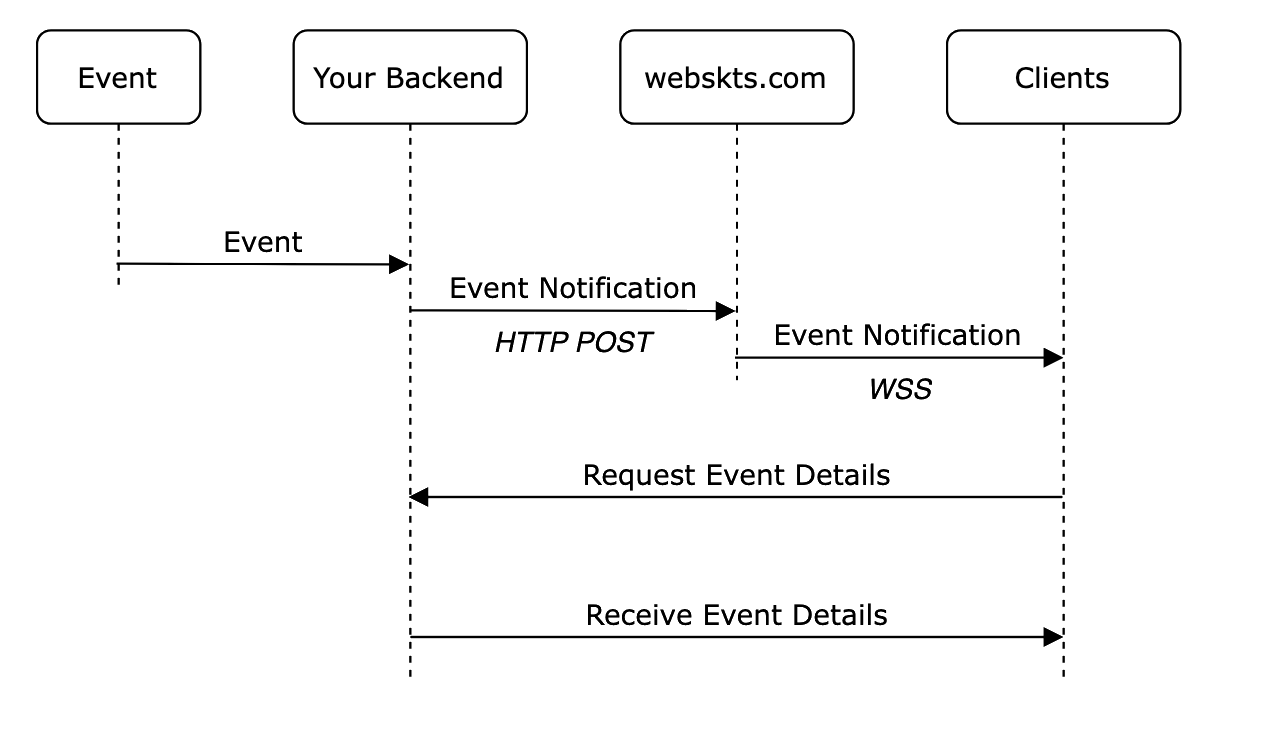
Your credentials
Your credentials should be stored on your server. You need two values, and a third for private channels:
| Value | Where to use it | Keep secret? |
|---|---|---|
api_key | HTTP Authorization header when sending messages | Yes — server-side only |
guid | WebSocket URL when receiving messages (the connection id) | Not a secret: it is in every page that connects. But anyone who has it can listen to your public channels, so don't post it, and rotate it if it leaks |
signing_secret | On your server, to sign channel tokens for private and presence channels | Yes — server-side only |
Storage & delivery
- Messages are kept for your replay window. Each message is kept so a client that reconnects can catch up on what it missed, then deleted. The window is 1 minute unless you choose a longer one for your project on your dashboard, up to what your plan allows (Personal / Dev 1 minute, Basic 1 hour, Pro 1 day, Max 7 days, Enterprise 7 days). A message is also deleted once 1,000 newer messages exist on the same channel, and a server restart can lose it sooner.
- Except a retained message. A push sent with
"retain": trueis also kept as its channel's current value, and everyone who joins the channel later receives it first, for as long as your plan keeps it (Personal / Dev 1 hour, Basic 1 day, Pro 7 days, Max 30 days, Enterprise 30 days). See Retained messages. - Delivery. A client that is disconnected when a message is sent misses it, unless it reconnects within the replay window and asks for a replay. It then gets every message it missed, in order and once each. The JavaScript client does that automatically, so a drop costs nothing. A client that was away longer is told that messages are gone, so it can fetch the current state from your server instead: see Catching up. Without replay, a message reaches each connected client at most once.
- Order. Messages arrive in the order they were sent, per channel.
- No retries. A message is never resent to a client that was connected when it went out. Your own server can retry a send safely: see Retrying safely. To know who has handled a message, use delivery receipts.
- Size. The JSON-encoded
dataof one message can be at most 256 KB; larger messages are refused with HTTP 413. - Connections drop. The server closes a connection that sends nothing for 60 seconds (40 seconds once it has joined a presence channel), so clients send
pingmore often than that. Deploys and network changes drop connections too: clients should reconnect with a backoff. The JavaScript client does both.
Securing your channels
Your API key is a secret only your backend uses. Your connection id is in every page that connects, so treat it as semi-public: anyone who has it can subscribe to your public channels, replay their recent messages and use your connection quota. Two settings on your dashboard limit that.
- Allowed API addresses. List the servers that may use your API key to send messages, as IP addresses (
203.0.113.7) or ranges (198.51.100.0/24, IPv6 too). A call from anywhere else is refused with403, so a key that leaks is useless elsewhere. Your dashboard's live stats and test message keep working. - Allowed websites. List the websites whose pages may connect, like
https://app.example.comorhttps://*.example.com. Pages on other websites are then refused. This works because browsers always say which website a page is on; a program that isn't a browser can claim any website, so this is not authentication. Once the list has an entry, connections that name no website at all (native apps, servers) are refused too. - Connections per address. One IP address can hold only part of your plan's connections (Basic 50, Pro 250, Max 1,000), so one runaway script can't use them all. Many people behind one office or mobile network share an address; if that is your audience and you hit the limit, ask us to raise it.
- Private and presence channels (
private-…,presence-…) can only be joined with a token your server signs with your signing secret, so the connection id alone never reaches them. See Private channels. - Rotating your API key or signing secret can keep the old one working for up to 7 days, so your servers can switch over without failed sends. Connected browsers are never disconnected by a rotation.
- Rotate the connection id if it leaks. The old id stops working at once and its connections are closed with code
4001. Your pages must load the new id before they can connect again; the JavaScript client emits$rotatedand stops instead of retrying.
WebSocket connection
Clients connect over a persistent WebSocket to receive messages in real time. The connection stays open until the client disconnects, or until it has sent nothing for 60 seconds: send the text frame ping every 25 seconds or so.
URL format
wss://{domain}/ws/{guid}/{channel}| Segment | Type | Description |
|---|---|---|
domain | string | ws.webskts.com on every plan, or your own. The dashboard shows the one each project uses; once a project switches, connect through it. |
guid | UUID string | Your account GUID — identifies which user's channels to subscribe to. |
channel | string | Channel name to subscribe to. Omit to use default. |
You can subscribe to multiple channels on one connection by separating names with commas. A reconnecting client can add ?resume= with the last message id it saw per channel, to replay what it missed within your replay window (see Catching up):
# Single channel
wss://ws.webskts.com/ws/a3f2e1d0-5b4c-4789-9e2f-1a3b5c7d9e0f/notifications

# Multiple channels on one connection
wss://ws.webskts.com/ws/a3f2e1d0-5b4c-4789-9e2f-1a3b5c7d9e0f/notifications,alerts,billing

# Reconnecting: replay what was missed after message 128 on notifications
wss://ws.webskts.com/ws/a3f2e1d0-5b4c-4789-9e2f-1a3b5c7d9e0f/notifications?resume=notifications:128
Your own domain
Every project starts on ws.webskts.com. A subdomain, {name}.webskts.com, works at once: Pro includes one, Max and Enterprise 50. Your own domain, like ws.your-company.com, goes live once the TXT and CNAME records the dashboard shows check out and its certificate is issued: Max includes one, and an Enterprise plan as many as agreed, one for each business. At a plan's limit of one, a new subdomain or domain takes the place of the old one: its projects move across, and an own domain keeps working until its replacement is verified.
One domain for all your projects. Any number of your projects can use one of your domains, so a platform with a project per customer of its own can give them all wss://ws.your-company.com. The domain doesn't tell projects apart; each one's connection id and API key do, so a project never sees another's channels, presence, retained messages or usage, and each keeps its own allowed websites. On the dashboard, Use for every project moves them all and makes new projects start there too (the Account API's domain field does the same per project). For a channel only some users may join, use private channels, signed with each project's own secret.
Switching a project's domain takes effect at once: its clients must then connect through the new one, and the old one stops working for that project. Pushes go to the same host: https:// and the domain.
Message events
All frames are JSON. On connect the server sends a welcome frame, then pushes message frames as your backend sends them.
Connected frame webskts.com → client, on connect
{
  "type": "connected",
  "channels": ["notifications"],
  "username": "alice",
  "server_time": "2025-01-15T10:30:00Z",
  "latest_ids": { "notifications": 128 }
}
Message frame webskts.com → client, when a push is received from your server
{
  "type": "message",
  "event": "order-update",
  "channel": "notifications",
  "id": 129,
  "data": { "order_id": 42, "status": "shipped" },
  "server_time": "2025-01-15T10:30:01Z"
}
The channel field tells you which channel the message came from — useful when subscribed to multiple channels on one connection. The id counts up per channel; keep the last one you saw to resume from it. latest_ids in the connected frame is the newest id per channel when you connected.
Straight after the connected frame (or a subscribed frame), a channel that holds a retained message sends it as a message frame with "retained": true and no id.
Send the text frame ping at any time to receive pong back and keep the connection alive.
Catching up
Every message on a channel has an id that counts up. A client that reconnects sends the last id it saw (?resume= in the URL, or since on a subscribe frame) and gets every message it missed, oldest first, before anything new: complete, in order, and once each. The JavaScript client does this for you.
The replay window
How long messages are kept for this is your project's replay window. Every project starts at 1 minute; choose a longer one on your dashboard (Message replay), up to what your plan allows. A change takes effect within a minute.
| Plan | Longest replay window |
|---|---|
| Personal / Dev | 1 minute |
| Basic | 1 hour |
| Pro | 1 day |
| Max | 7 days |
| Enterprise | 7 days |
- Longer isn't always better. A page that was away for hours catches up on every message it missed before it sees new ones. If what you send is state (a score, a status), a page that has been away is better off fetching the current state from your server; a retained message gives a joining page the latest value without any replay at all.
- Long windows suit pages that must not miss an event: a feed, a log, a running session people drop in and out of.
- Off stores nothing: a page that reconnects gets only new messages (and the channel's retained message, if it has one).
- At most 1,000 messages per channel are kept, whatever the window: the newest.
- The window is per project, not per channel. Channels that need different windows can go in separate projects; a page can also skip replay with
resume: falseon the JavaScript client.
When messages are gone
If the kept messages no longer reach back to the id a client sent (it was away longer than the window, more than 1,000 messages came after it, or a server restarted), it receives a gap frame before the replay. Messages after from and before to are gone; what follows is complete.
{ "type": "gap", "channel": "orders", "from": 128, "to": 342 }The JavaScript client (1.7.0 and later) emits $gap with { channel, from, to }, on the client and on the channel. On $gap, fetch the current state from your own server: the missed messages can't be recovered. Older clients ignore the frame.
Joining late
A page that was never connected has nothing to resume from. To have it replay what is still kept, from the oldest, start it at id 0: since: 0 on the JavaScript client or subscribe(name, { since: 0 }), ?resume=orders:0 in the URL, or "since": 0 on a subscribe frame. Someone joining a running quiz or presentation fast-forwards through what has happened so far. A start at 0 never produces a gap frame.
<script src="https://webskts.com/resources/webskts_push_client.js"></script>
<script>
const client = new PushClient({
    host:    'wss://ws.webskts.com',
    guid:    'YOUR_GUID',
    channel: 'orders',
});
client
    .on('order-update', (data) => applyUpdate(data))   // replayed ones too, in order, once each
    .on('$resumed', ({ channel, count }) => console.log(`caught up on ${count} on ${channel}`))
    .on('$gap', async ({ channel }) => {
        // Some messages are gone (away too long, or more than 1,000 since):
        // what follows is complete, but what came before it is not.
        showOrders(await (await fetch('/orders/current')).json());
    });
client.connect();

// Joining a running session: replay everything still kept, from the start.
const live = new PushClient({ host: 'wss://ws.webskts.com', guid: 'YOUR_GUID', channel: 'quiz-7', since: 0 });
// Or on a client you already have:
const slides = client.subscribe('slides-42', { since: 0 });
</script>
// Keep the last id per channel and send it back when you reconnect.
let lastId = {}; // channel → id
function connect() {
const resume = Object.entries(lastId).map(([ch, id]) => `${ch}:${id}`).join(',');
const ws = new WebSocket(`wss://ws.webskts.com/ws/YOUR_GUID/orders` + (resume ? `?resume=${resume}` : ''));
ws.onmessage = (event) => {
if (event.data === 'pong') return;
const msg = JSON.parse(event.data);
if (msg.type === 'gap') {
// Messages after msg.from and before msg.to are gone: refetch your state.
refetchOrders();
} else if (msg.type === 'message' && msg.id != null) {
if (msg.id <= (lastId[msg.channel] ?? 0)) return; // already seen
lastId[msg.channel] = msg.id;
applyUpdate(msg.data);
}
};
// ...ping every 25 seconds and reconnect with a backoff, as in "Client examples".
}The JavaScript client
Any WebSocket library works: the protocol above is all there is, and the vanilla JavaScript example below needs nothing else. For convenience we also offer a small client, webskts_push_client.js. It reconnects with a backoff, sends the keep-alive ping, replays messages missed while disconnected (and tells you with $gap when some are gone), and stops when the connection id is rotated ($rotated) or the account is suspended ($suspended).
- Always the current version:
https://webskts.com/resources/webskts_push_client.js. Browsers check for a new version every few minutes. - A fixed version: each version has its own address that never changes, so you choose when to upgrade. Add the
integrityvalue to have the browser refuse any other file. - On your own site: download either file and serve it yourself. It has no dependencies and talks only to your WebSocket address. From version 1.6.0 it is MIT licensed, and the licence is in the file's header, so you may copy it into your own repository; keep the copyright line.
<script src="https://webskts.com/resources/webskts_push_client.v1.7.0.js"
        integrity="sha384-s93zHak8M6oh5DUF4Jz/EKoP8tjfAlPFvuDpxuJxz581ESMMZgsi5d+ODmlwgSdC"
crossorigin="anonymous"></script>| Version | Address | integrity |
|---|---|---|
| 1.7.0 | https://webskts.com/resources/webskts_push_client.v1.7.0.js | sha384-s93zHak8M6oh5DUF4Jz/EKoP8tjfAlPFvuDpxuJxz581ESMMZgsi5d+ODmlwgSdC |
| 1.6.0 | https://webskts.com/resources/webskts_push_client.v1.6.0.js | sha384-KK/ICjBUcJEa1e3sG+wbqEjPwJ265IvRogoJQBVmCBKdNq/aBSYYdUv6JflQu8ha |
| 1.5.0 | https://webskts.com/resources/webskts_push_client.v1.5.0.js | sha384-MCFfGCn0L9PRqyuwsWmCEoq1mY2MXVDWwHoZwkA6RKtcFfxoO5Td9zNqzWIaC90Z |
If your site sets a Content Security Policy, allow the client's address (or your own copy) in script-src, and your WebSocket address in connect-src: wss://ws.webskts.com, or your own subdomain or domain if you use one.
Client examples
<!-- Optional: a small client that reconnects, keeps the connection alive and
     replays messages missed while disconnected. Load it from us, or download
     it and serve it from your own site. -->
<script src="https://webskts.com/resources/webskts_push_client.js"></script>
<script>
const client = new PushClient({
    host:     'wss://ws.webskts.com',
    guid:     'YOUR_GUID',
    channels: ['notifications', 'alerts'],   // or: channel: 'notifications'
});
client
    .on('$ready', ({ channels }) => {
        console.log('Connected to:', channels);
    })
    .on('$rotated', () => {
        // Your connection id was rotated: fetch the new one and connect again.
    })
    .on('$suspended', () => {
        // The account is suspended: the client stops until you connect again.
    })
    .on('$gap', ({ channel }) => {
        // Away longer than your replay window: some messages are gone.
        // Fetch the current state from your own server.
    })
    .on('order-update', (data, raw) => {
        // raw.channel tells you which channel this came from
        console.log(`Order update on ${raw.channel}:`, data);
    })
    .on('*', (data, raw) => {
        // Catch-all for any event
        console.log(`[${raw.event}]`, data);
    });
client.connect();
</script>
// No library: the browser's own WebSocket.
const GUID = 'YOUR_GUID';
const CHANNELS = 'notifications'; // or 'notifications,alerts'
const URL = `wss://ws.webskts.com/ws/${GUID}/${CHANNELS}`;
let retries = 0;
let pinger;
function connect() {
const ws = new WebSocket(URL);
ws.onopen = () => {
retries = 0;
// The server closes a socket that sends nothing for 60 seconds.
pinger = setInterval(() => ws.readyState === WebSocket.OPEN && ws.send('ping'), 25000);
};
ws.onmessage = (event) => {
if (event.data === 'pong') return; // the reply to our ping
const msg = JSON.parse(event.data);
if (msg.type === 'connected') {
console.log('Ready on channels:', msg.channels);
} else if (msg.type === 'message') {
console.log(`[${msg.channel}] ${msg.event}:`, msg.data);
}
};
ws.onclose = (e) => {
clearInterval(pinger);
// 4001: the connection id was rotated. 4003: the account is suspended.
// Reconnecting with this id would be refused, so stop.
if (e.code === 4001 || e.code === 4003) return;
// Anything else (a deploy, a dropped network): try again, waiting
// longer each time. Messages sent meanwhile are missed;
// webskts_push_client.js replays them for you.
const delay = Math.min(30000, 1000 * 2 ** retries++) + Math.random() * 1000;
setTimeout(connect, delay);
};
}
connect();# pip install websocket-client
import websocket, json
GUID = 'YOUR_GUID'
CHANNEL = 'notifications'
URL = f'wss://ws.webskts.com/ws/{GUID}/{CHANNEL}'
def on_message(ws, message):
msg = json.loads(message)
if msg['type'] == 'connected':
print(f"Ready on: {msg['channels']}")
elif msg['type'] == 'message':
print(f"[{msg['channel']}] {msg['event']}:", msg['data'])
def on_error(ws, error): print('Error:', error)
def on_close(ws, code, msg): print('Disconnected', code)
def on_open(ws): print('Connecting...')
ws = websocket.WebSocketApp(
URL,
on_message=on_message,
on_error=on_error,
on_close=on_close,
on_open=on_open,
)
# ping_interval keeps the socket alive: the server closes one idle for 60 seconds.
# reconnect=5 retries after 5 s; close code 4001 means the id was rotated.
ws.run_forever(ping_interval=25, reconnect=5)// Requires iOS 13+ / macOS 10.15+ (URLSessionWebSocketTask — no deps needed)
import Foundation
let guid = "YOUR_GUID"
let channel = "notifications"
let url = URL(string: "wss://ws.webskts.com/ws/\(guid)/\(channel)")!
let task = URLSession.shared.webSocketTask(with: url)
task.resume()
func receive() {
task.receive { result in
switch result {
case .success(let message):
if case .string(let text) = message,
let json = try? JSONSerialization.jsonObject(with: Data(text.utf8)) as? [String: Any],
json["type"] as? String == "message" {
print("[\(json["channel"]!)] \(json["event"]!):", json["data"]!)
}
receive() // loop
case .failure(let error):
print("Error:", error)
}
}
}
receive()
// The server closes a socket that sends nothing for 60 seconds.
Timer.scheduledTimer(withTimeInterval: 25, repeats: true) { _ in
task.send(.string("ping")) { _ in }
}// OkHttp (already included in Android) — add to build.gradle if needed:
// implementation 'com.squareup.okhttp3:okhttp:4.12.0'
import okhttp3.*
import org.json.JSONObject
val guid = "YOUR_GUID"
val channel = "notifications"
val request = Request.Builder()
.url("wss://ws.webskts.com/ws/$guid/$channel")
.build()
// pingInterval keeps the socket alive: the server closes one idle for 60 seconds.
OkHttpClient.Builder().pingInterval(25, java.util.concurrent.TimeUnit.SECONDS).build()
.newWebSocket(request, object : WebSocketListener() {
override fun onMessage(ws: WebSocket, text: String) {
val msg = JSONObject(text)
when (msg.getString("type")) {
"connected" -> println("Ready: ${msg.getJSONArray("channels")}")
"message" -> println("[${msg.getString("channel")}] ${msg.getString("event")}: ${msg.get("data")}")
}
}
override fun onFailure(ws: WebSocket, t: Throwable, r: Response?) =
println("Error: $t")
})Private channels
A channel's name decides who may join it. Public channels work as they always have: anyone with your connection id can listen. Private and presence channels can only be joined with a channel token your own server signs, so you can send real data on them, not just signals.
| Kind | Names | Who may join | Plans |
|---|---|---|---|
| Public | anything else | anyone with your connection id (and an allowed website, if you set any) | every plan |
| Private | private-… | a connection whose token names the channel | Basic, Pro, Max, Enterprise |
| Presence | presence-… | as private; members also see who else is there | Pro, Max, Enterprise |
The private- and presence- prefixes are reserved on every plan, so a channel with one of those names is never public. Private and presence names may use A–Z a–z 0–9 _ - = @ . ; :, up to 200 bytes.
- Your page asks your server for a token. Your server checks who is signed in, and signs a token naming only the channels that person may join.
- The page connects as usual, then sends the token in an
authframe and joins the channels withsubscribe. The JavaScript client does both for you. - Before the token expires the page sends a fresh one on the same connection; nothing reconnects. If a renewed token no longer names a channel, the connection leaves it at once, so taking away a permission works at the next renewal.
The token is sent only in a frame after connecting, never in the URL, because URLs end up in browser history and proxy logs. A refused token never closes the connection: public channels keep working.
Channel tokens
A channel token is a standard JWT, signed with HMAC-SHA256 (HS256) using your project's signing secret from the dashboard. It is a separate secret from your API key, so the two can be rotated independently. Any JWT library works, or the few lines below. No call to us is needed to make one.
| Claim | Required | Meaning |
|---|---|---|
guid | yes | Your connection id. A token for another project, or for a connection id you have since rotated, is refused (wrong_guid). |
sub | yes | Your id for the person, 1–128 bytes. Presence counts members by it; it can't change for the life of a connection. |
channels | yes | 1–100 entries, each a channel name or a pattern ending in *: private-orders-* matches every name that starts private-orders-. Every entry starts private- or presence-. |
iat, exp | yes | Issued and expiry times, Unix seconds. A token may last at most 24 hours; 30 seconds of clock difference is allowed. |
info | no | A JSON object of at most 256 bytes, shown to the other members of a presence channel as it is, e.g. {"name":"Anna Svensson"}. |
client_events | no | true, or patterns like channels: where this person may send client events. Without it they may send none. |
Exactly what is signed: BASE64URL(header) + "." + BASE64URL(payload), base64url without padding (RFC 7515). The signature is BASE64URL(HMAC-SHA256(signing_secret, that string)), and the token is the two joined by a third .. The header must be {"alg":"HS256","typ":"JWT"}: every other algorithm, none included, is refused. A token can be at most 8 KB.
<?php
// A channel token: a JWT (HS256) signed with your signing secret.
function webskts_channel_token(string $secret, array $claims): string
{
    $b64 = fn (string $s): string => rtrim(strtr(base64_encode($s), '+/', '-_'), '=');
    $input = $b64('{"alg":"HS256","typ":"JWT"}') . '.'
           . $b64(json_encode($claims, JSON_UNESCAPED_SLASHES | JSON_UNESCAPED_UNICODE));
    return $input . '.' . $b64(hash_hmac('sha256', $input, $secret, true));
}

// For the signed-in user, only the channels they may join:
$token = webskts_channel_token(getenv('WEBSKTS_SIGNING_SECRET'), [
    'guid'     => 'YOUR_GUID',
    'sub'      => (string) $user->id,                 // who they are
    'channels' => ['private-orders-' . $user->id, 'presence-room-*'],
    'iat'      => time(),
    'exp'      => time() + 3600,                      // at most 24 hours
    'info'     => ['name' => $user->name],            // shown to other members
    'client_events' => ['presence-room-*'],           // where they may send
]);
header('Content-Type: application/json');
echo json_encode(['token' => $token]);
const crypto = require('crypto');
// A channel token: a JWT (HS256) signed with your signing secret.
function channelToken(secret, claims) {
const b64 = (s) => Buffer.from(s).toString('base64url');
const input = b64('{"alg":"HS256","typ":"JWT"}') + '.' + b64(JSON.stringify(claims));
return input + '.' + crypto.createHmac('sha256', secret).update(input).digest('base64url');
}
// For the signed-in user, only the channels they may join:
app.get('/realtime/token', requireLogin, (req, res) => {
const now = Math.floor(Date.now() / 1000);
res.json({ token: channelToken(process.env.WEBSKTS_SIGNING_SECRET, {
guid: 'YOUR_GUID',
sub: String(req.user.id),
channels: [`private-orders-${req.user.id}`, 'presence-room-*'],
iat: now,
exp: now + 3600, // at most 24 hours
info: { name: req.user.name }, // shown to other members
client_events: ['presence-room-*'], // where they may send
}) });
});import base64, hashlib, hmac, json, os, time
# A channel token: a JWT (HS256) signed with your signing secret.
def channel_token(secret: str, claims: dict) -> str:
b64 = lambda b: base64.urlsafe_b64encode(b).rstrip(b"=").decode()
signing_input = b64(b'{"alg":"HS256","typ":"JWT"}') + "." + b64(
json.dumps(claims, separators=(",", ":")).encode())
sig = hmac.new(secret.encode(), signing_input.encode(), hashlib.sha256).digest()
return signing_input + "." + b64(sig)
# For the signed-in user, only the channels they may join:
now = int(time.time())
token = channel_token(os.environ["WEBSKTS_SIGNING_SECRET"], {
"guid": "YOUR_GUID",
"sub": str(user.id),
"channels": [f"private-orders-{user.id}", "presence-room-*"],
"iat": now,
"exp": now + 3600, # at most 24 hours
"info": {"name": user.name}, # shown to other members
"client_events": ["presence-room-*"], # where they may send
})To check your own signer, sign this payload with this secret and header; you should get exactly this token:
secret   wss_test_0123456789abcdef0123456789abcdef
header   {"alg":"HS256","typ":"JWT"}
payload  {"guid":"00000000-0000-4000-8000-000000000000","sub":"u1","channels":["presence-room-*"],"iat":1700000000,"exp":1700003600,"info":{"name":"Test"}}

token    eyJhbGciOiJIUzI1NiIsInR5cCI6IkpXVCJ9.eyJndWlkIjoiMDAwMDAwMDAtMDAwMC00MDAwLTgwMDAtMDAwMDAwMDAwMDAwIiwic3ViIjoidTEiLCJjaGFubmVscyI6WyJwcmVzZW5jZS1yb29tLSoiXSwiaWF0IjoxNzAwMDAwMDAwLCJleHAiOjE3MDAwMDM2MDAsImluZm8iOnsibmFtZSI6IlRlc3QifX0.nhFRkYxqLwQ3HnbMb3-bdFng4xQ7Lupp8IguwlTl3XA
Rotating the signing secret on your dashboard can keep the old secret working for up to 7 days, so tokens your servers signed just before still work while you update them. People already connected keep their channels until their token expires either way.
Presence
On a presence-… channel each member sees who else is there. On joining you get the current members, yourself included, and then a frame each time someone joins or leaves.
- Members are people, not tabs. They are counted by the token's
sub: someone with two tabs or two devices is one member.member_addedgoes out when their first connection joins,member_removedwhen their last one leaves. Theirinfois taken from their first connection. - How fast a leave is noticed. A closed tab or an
unsubscribeat once (within a quarter of a second across our servers). A connection that goes silent, such as a laptop lid closing, 40 to 44 seconds after it last sent anything: connections in a presence channel are closed after 40 seconds without aping(the JavaScript client pings every 25), checked every 4 seconds. If one of our servers fails, its members are removed by the others within about 4 seconds. - Size. A presence channel holds up to your plan's member limit (see Limits by plan). A new member over it is refused with
subscription_errorfull; another tab of someone already in is always let in.
Your server can read a channel's members at any time with your API key:
https://api.webskts.com/api/channels/{name}/members{ "channel": "presence-room-42", "members": [ { "id": "42", "info": { "name": "Anna Svensson" } } ], "count": 1 }URL-encode the name. An empty presence channel answers {"members":[],"count":0}, and so does one that doesn't exist; a name that isn't a presence channel answers 404. GET /api/channels/{name} answers {"channel","occupied","subscriber_count"} for any channel.
Client events
On presence channels (and private ones) a member can send a small message straight to the other members, without a round trip through your server: "Anna is typing a note…", a cursor, a selection. The event name must start client-.
- The person's token must allow it (
client_events). That is your server's say over who may send where; your server doesn't see the events themselves. - Each event is delivered to every other member, never back to the sender, with the sender's
user_id(their token'ssub) added by us, so it can't be forged. - At most 4 KB of
data, and your plan's number per second per connection. Each event counts as one message towards your hourly, daily and monthly limits. Client events are not stored, so a reconnecting member doesn't get them replayed. - A refused event (too fast, too big, not allowed, over quota) is answered with an
errorframe; the connection stays open.
Delivery receipts
A message sent to a channel isn't the same as a person having seen it. With delivery receipts, every page that joined with a channel token reports the last message it finished handling on each of its channels, and your server can ask how far each person has got: who has seen slide 5, who hasn't read the latest notice. Receipts come with Pro, Max, Enterprise.
- A receipt means "this person's page ran its handlers for every message on the channel up to this id". It doesn't mean they looked at the screen; to report only that, see
ack: "manual"below. - It needs a token. Receipts are per person (the token's
sub), so a page that never sends a token reports nothing, and anonymous viewers of public channels aren't counted. Someone with two tabs has one receipt: the furthest either has got. - In the browser there is nothing to do. The JavaScript client 1.7.0 and later sends a receipt after your handlers have run, at most one small frame per channel per second (
ackInterval, in milliseconds). Withack: "manual"it sends only what you report withclient.ack(channel, id). Older clients send none. - Kept for 7 days after a person's last report. At most 10,000 people per channel are tracked; reports from anyone new after that are dropped.
https://api.webskts.com/api/channels/{name}/receiptsWith your API key, like a push. URL-encode the name.
{
  "channel": "presence-deck-42",
  "latest_id": 1792723917942031,
  "receipts": [
    { "id": "anna", "acked": 1792723917942031, "at": 1761840000 },
    { "id": "bo",   "acked": 1792723917942029, "at": 1761839990 }
  ],
  "count": 2,
  "missing": ["cy"]
}| Field | Meaning |
|---|---|
latest_id | The id of the newest message on the channel |
receipts | One per person, sorted by id (their token's sub): acked is the newest message id they have handled (equal to latest_id means up to date), at the time of their last report, in Unix seconds |
count | How many people have a receipt |
missing | Presence channels only: the members there now who have no receipt yet |
On a plan without receipts the endpoint answers 403 receipts are not enabled for this account. Your dashboard shows any channel's receipts too.
Without the JavaScript client, a page sends {"type":"ack","channel":"presence-deck-42","id":1792723917942031} after its auth frame was accepted. It gets no reply. An ack is ignored without a token, on a plan without receipts, or for a channel the page hasn't joined; a lower id than one already reported never moves a receipt back.
curl https://api.webskts.com/api/channels/presence-deck-42/receipts \
  -H "Authorization: Bearer YOUR_API_KEY"
<?php
$ch = curl_init('https://api.webskts.com/api/channels/' . rawurlencode('presence-deck-42') . '/receipts');
curl_setopt_array($ch, [
CURLOPT_RETURNTRANSFER => true,
CURLOPT_HTTPHEADER => ['Authorization: Bearer YOUR_API_KEY'],
]);
$r = json_decode(curl_exec($ch), true);
curl_close($ch);
// Who has handled the newest message on the channel
foreach ($r['receipts'] as $receipt) {
$seen = $receipt['acked'] >= $r['latest_id'];
echo $receipt['id'], $seen ? ' is up to date' : ' is behind', "\n";
}
echo 'No receipt yet: ', implode(', ', $r['missing'] ?? []), "\n";const res = await fetch('https://api.webskts.com/api/channels/' + encodeURIComponent('presence-deck-42') + '/receipts', {
headers: { 'Authorization': 'Bearer YOUR_API_KEY' }
});
const r = await res.json();
const behind = r.receipts.filter((x) => x.acked < r.latest_id).map((x) => x.id);
console.log('Behind:', behind, 'No receipt yet:', r.missing ?? []);import requests
from urllib.parse import quote
r = requests.get(
'https://api.webskts.com/api/channels/' + quote('presence-deck-42', safe='') + '/receipts',
headers={'Authorization': 'Bearer YOUR_API_KEY'}
).json()
behind = [x['id'] for x in r['receipts'] if x['acked'] < r['latest_id']]
print('Behind:', behind, 'No receipt yet:', r.get('missing', []))<script src="https://webskts.com/resources/webskts_push_client.js"></script>
<script>
// With a token, the client reports each message once your handlers
// have run. Nothing else to do.
const client = new PushClient({
host: 'wss://ws.webskts.com',
guid: 'YOUR_GUID',
getToken: async () => (await (await fetch('/realtime/token')).json()).token,
});
const deck = client.subscribe('presence-deck-42');
deck.on('slide', (data) => showSlide(data));
client.connect();
// Or report only what was really looked at:
// new PushClient({ ..., ack: 'manual' })
// deck.on('slide', (data, raw) => { showSlide(data); client.ack(raw.channel, raw.id); });
</script>In the browser
The JavaScript client (version 1.6.0 and later) handles tokens and renewal, joins private and presence channels, keeps each channel's members up to date and sends client events. Give it a getToken() function that asks your server for a token: it is called on every connect and again before the token expires.
<script src="https://webskts.com/resources/webskts_push_client.js"></script>
<script>
  const client = new PushClient({
    host: 'wss://ws.webskts.com',
    guid: 'YOUR_GUID',
    channels: ['announcements'],           // public channels, as before
    // Called on every (re)connect and before the token expires.
    getToken: async () => {
      const res = await fetch('/realtime/token', { credentials: 'same-origin' });
      return (await res.json()).token;
    },
  });

  const room = client.subscribe('presence-room-42');
  room
    .on('$subscribed', () => render(room.members))     // Map id → info, you included
    .on('$member_added', (m) => render(room.members))  // { id, info }
    .on('$member_removed', (m) => render(room.members))
    .on('$subscription_error', ({ reason }) => console.warn(reason))
    .on('client-typing', (data, { user_id }) => showTyping(user_id, data));

  noteField.addEventListener('input', () => room.send('client-typing', { field: 'note' }));
  client.on('$auth_error', ({ reason }) => console.warn('token refused:', reason));
  client.connect();
</script>| On the channel | When |
|---|---|
room.members | A Map of member id → info, kept up to date, you included |
$subscribed / $subscription_error | Joined, or refused: not_permitted, full, quota, invalid_name |
$member_added / $member_removed | Someone joined or left (presence) |
$expired / $revoked | The token ran out (the channel comes back after the next token), or a new token no longer names the channel |
room.send(event, data) | Sends a client event; false if not connected, not allowed or too fast |
On the client itself: $auth_ok, $auth_error (with reason) and $auth_failed (closed with 4008, no automatic reconnect).
Frames
Without the client, these are the frames involved. Everything a client sends besides ping is a JSON object with a type.
→ {"type":"auth","token":"eyJhbGciOi…"}
← {"type":"auth_ok","sub":"42","exp":1761840000}
→ {"type":"subscribe","channel":"presence-room-42"}
← {"type":"subscribed","channel":"presence-room-42","latest_id":128,
   "members":[{"id":"42","info":{"name":"Anna Svensson"}},{"id":"7","info":{"name":"Erik"}}],
   "me":{"id":"42"}}
← {"type":"member_added","channel":"presence-room-42","member":{"id":"9","info":{"name":"Maja"}}}
← {"type":"member_removed","channel":"presence-room-42","member":{"id":"7"}}
→ {"type":"client_event","channel":"presence-room-42","event":"client-typing","data":{"field":"note"}}
← {"type":"client_event","channel":"presence-room-42","event":"client-typing","data":{"field":"note"},"user_id":"9"}| Frame | Meaning |
|---|---|
auth_error | Token refused: invalid, expired, wrong_guid, no_secret, feature_off (your plan has no private channels), sub_changed (a renewal for another person), too_large |
subscription_error | Join refused: not_permitted, full, quota, invalid_name. not_permitted looks exactly the same whether or not the channel exists or is in use, so nobody can find out which channels you have by trying names |
subscription_expired, subscription_revoked, unsubscribed | The token ran out, a new token no longer names the channel, or an unsubscribe was done |
error | A client event was refused: rate_limited, too_large, not_permitted, quota |
ack (client to server) | {"type":"ack","channel","id"}: a delivery receipt, "I have handled this channel up to this id". No reply |
subscribe takes an optional since (the last message id you saw) to replay what you missed, as ?resume= does, and works for public channels too; 0 replays everything still kept (see Catching up).
Limits by plan
| Plan | Private channels | Presence & client events | Members per presence channel | Client events per second, per connection | Delivery receipts |
|---|---|---|---|---|---|
| Personal / Dev | No | No | — | — | No |
| Basic | Yes | No | — | — | No |
| Pro | Yes | Yes | 100 | 10 | Yes |
| Max | Yes | Yes | 1,000 | 20 | Yes |
| Enterprise | Yes | Yes | Unlimited | 20 | Yes |
On every plan: a token lasts at most 24 hours, is at most 8 KB and names at most 100 channels; info is at most 256 bytes and a client event's data at most 4 KB. Messages and client events count towards your plan's hourly, daily and monthly message limits; there are no per-channel message limits. Messages over a limit are refused, never delayed: a send over it is answered 429, a client event over it with an error frame.
Push to one channel
Send a message to all clients currently subscribed to a specific channel. The request is authenticated with your API key in the Authorization header. All endpoints are located at https://api.webskts.com, or at your own subdomain or domain once you have picked one.
/api/pushRequest body
| Field | Type | Description |
|---|---|---|
channel | string required | Channel name to push to |
event | string required | Event type — clients filter on this |
data | object required | Any JSON object — your message payload, at most 256 KB as JSON |
retain | boolean | true also keeps it as the channel's retained message, sent first to everyone who joins later |
Headers
| Header | Description |
|---|---|
Authorization required | Bearer and your API key |
Idempotency-Key | A value you choose, 1 to 128 printable characters, so a retry is never sent twice: see Retrying safely |
Response
{ "ok": true, "channel": "notifications", "event": "order-update" }Broadcast to many channels
Push the same message to multiple channels in a single request. Each channel's subscribers receive their own copy with the correct channel field set.
/api/broadcastRequest body
| Field | Type | Description |
|---|---|---|
channels | string[] required | Array of channel names to push to |
event | string required | Event type |
data | object required | Message payload |
retain | boolean | true keeps it as the retained message of every channel named |
It takes the same headers as a push, Idempotency-Key included.
Response
{ "ok": true, "channels": ["notifications", "alerts"], "event": "order-update" }Sender examples
# Push to one channel
curl -X POST https://api.webskts.com/api/push \
  -H "Authorization: Bearer YOUR_API_KEY" \
  -H "Content-Type: application/json" \
  -d '{
    "channel": "notifications",
    "event": "order-update",
    "data": { "order_id": 42, "status": "shipped" }
  }'

# Broadcast to multiple channels
curl -X POST https://api.webskts.com/api/broadcast \
  -H "Authorization: Bearer YOUR_API_KEY" \
  -H "Content-Type: application/json" \
  -d '{
    "channels": ["notifications", "alerts"],
    "event": "maintenance",
    "data": { "message": "Scheduled downtime at midnight" }
  }'
<?php
function pushserver_send($endpoint, $payload): array {
$ch = curl_init('https://api.webskts.com' . $endpoint);
curl_setopt_array($ch, [
CURLOPT_RETURNTRANSFER => true,
CURLOPT_POST => true,
CURLOPT_POSTFIELDS => json_encode($payload),
CURLOPT_HTTPHEADER => [
'Authorization: Bearer YOUR_API_KEY',
'Content-Type: application/json',
],
]);
$body = curl_exec($ch);
curl_close($ch);
return json_decode($body, true);
}
// Push to one channel
pushserver_send('/api/push', [
'channel' => 'notifications',
'event' => 'order-update',
'data' => ['order_id' => 42, 'status' => 'shipped'],
]);
// Broadcast to multiple channels
pushserver_send('/api/broadcast', [
'channels' => ['notifications', 'alerts'],
'event' => 'maintenance',
'data' => ['message' => 'Scheduled downtime at midnight'],
]);// Node.js 18+ (built-in fetch) — or replace with axios/node-fetch
const BASE = 'https://api.webskts.com';
const API_KEY = 'YOUR_API_KEY';
async function push(endpoint, payload) {
const res = await fetch(BASE + endpoint, {
method: 'POST',
headers: {
'Authorization': `Bearer ${API_KEY}`,
'Content-Type': 'application/json',
},
body: JSON.stringify(payload),
});
return res.json();
}
// Push to one channel
await push('/api/push', {
channel: 'notifications',
event: 'order-update',
data: { order_id: 42, status: 'shipped' },
});
// Broadcast to multiple channels
await push('/api/broadcast', {
channels: ['notifications', 'alerts'],
event: 'maintenance',
data: { message: 'Scheduled downtime at midnight' },
});# pip install requests
import requests
BASE = 'https://api.webskts.com'
HEADERS = {
'Authorization': 'Bearer YOUR_API_KEY',
'Content-Type': 'application/json',
}
# Push to one channel
requests.post(f'{BASE}/api/push', json={
'channel': 'notifications',
'event': 'order-update',
'data': {'order_id': 42, 'status': 'shipped'},
}, headers=HEADERS)
# Broadcast to multiple channels
requests.post(f'{BASE}/api/broadcast', json={
'channels': ['notifications', 'alerts'],
'event': 'maintenance',
'data': {'message': 'Scheduled downtime at midnight'},
}, headers=HEADERS)require 'net/http'
require 'json'
require 'uri'
def push(endpoint, payload)
uri = URI("https://api.webskts.com#{endpoint}")
http = Net::HTTP.new(uri.host, uri.port)
http.use_ssl = true
req = Net::HTTP::Post.new(uri)
req['Authorization'] = 'Bearer YOUR_API_KEY'
req['Content-Type'] = 'application/json'
req.body = payload.to_json
JSON.parse(http.request(req).body)
end
# Push to one channel
push('/api/push', {
channel: 'notifications',
event: 'order-update',
data: { order_id: 42, status: 'shipped' }
})
# Broadcast
push('/api/broadcast', {
channels: ['notifications', 'alerts'],
event: 'maintenance',
data: { message: 'Scheduled downtime at midnight' }
})package main
import (
"bytes"; "encoding/json"; "fmt"; "net/http"
)
const (
base = "https://api.webskts.com"
apiKey = "YOUR_API_KEY"
)
func push(endpoint string, payload any) error {
body, _ := json.Marshal(payload)
req, _ := http.NewRequest("POST", base+endpoint, bytes.NewReader(body))
req.Header.Set("Authorization", "Bearer "+apiKey)
req.Header.Set("Content-Type", "application/json")
resp, err := http.DefaultClient.Do(req)
if err == nil { resp.Body.Close() }
return err
}
func main() {
// Push to one channel
push("/api/push", map[string]any{
"channel": "notifications",
"event": "order-update",
"data": map[string]any{"order_id": 42, "status": "shipped"},
})
// Broadcast to multiple channels
push("/api/broadcast", map[string]any{
"channels": []string{"notifications", "alerts"},
"event": "maintenance",
"data": map[string]any{"message": "Scheduled downtime"},
})
fmt.Println("Done")
}Retained messages
A channel can keep its last message for whoever joins it later. Send a push with "retain": true and it is delivered as usual and kept as the channel's current value: every client that subscribes afterwards receives it first, so it knows where things stand straight away instead of waiting for the next change. A device's last reading, a job's status, who is on call, a document's title.
Think of it as one stored value per channel, pushed to whoever joins. It is there to use whenever you want: there is nothing to turn on, and it works on every plan.
- One per channel. A new retained push replaces the one before; a push without
retainleaves it alone. You can keep one on every channel your plan allows. - Sent first. A client joining the channel (in the connection URL, with a
subscribeframe, or a private channel once its token is accepted) receives it straight afterconnectedorsubscribed, before anything else. - Marked, and without an
id. The frame carries"retained": trueand noid, so it never moves a client's resume point or trips its duplicate check.server_timeis when it was sent, which tells you how old it is. - State, not an event. A client can receive the same retained message again each time it reconnects. Treat it as the current value, not as something that just happened.
- Kept until it expires, after the period below, or until you clear it. Rotating your connection id keeps it.
Response
A push with retain answers with "retained": true. In the rare case that it says false, the message was delivered but not kept; send it again to keep it.
{ "ok": true, "channel": "device-17", "event": "reading", "retained": true }What a joining client receives
{
  "type": "message",
  "retained": true,
  "event": "reading",
  "channel": "device-17",
  "data": { "temp": 21.5 },
  "server_time": "2025-01-15T10:30:01Z"
}
The JavaScript client hands it to your on(event) handlers like any message, with raw.retained === true.
Reading and clearing
| Method | Path | Returns |
|---|---|---|
GET | /api/retained | Every channel holding one, without the data: channels (each with channel, event, server_time and expires_at in Unix seconds), count, limit and retained_ttl (your plan's period, in seconds) |
GET | /api/channels/{name}/retained | That channel's: channel, event, data, server_time, expires_at. 404 when it holds none |
DELETE | /api/channels/{name}/retained | Clears it: { "ok": true, "action": "clear_retained", "channel", "cleared" }, where cleared is false if there was none |
Each takes your API key, like a push. Your dashboard lists them too, and can show and clear each one.
{
  "channels": [
    { "channel": "device-17", "event": "reading",
      "server_time": "2025-01-15T10:30:01Z", "expires_at": 1737542401 }
  ],
  "count": 1,
  "limit": 500,
  "retained_ttl": 604800
}
How long they are kept
| Plan | Kept for |
|---|---|
| Personal / Dev | 1 hour |
| Basic | 1 day |
| Pro | 7 days |
| Max | 30 days |
| Enterprise | 30 days |
Examples
# Push a reading and keep it as the channel's current value
curl -X POST https://api.webskts.com/api/push \
  -H "Authorization: Bearer YOUR_API_KEY" \
  -H "Content-Type: application/json" \
  -d '{
    "channel": "device-17",
    "event": "reading",
    "data": { "temp": 21.5 },
    "retain": true
  }'

# Every channel holding a retained message (without the data)
curl https://api.webskts.com/api/retained \
  -H "Authorization: Bearer YOUR_API_KEY"

# One channel's retained message, with its data
curl https://api.webskts.com/api/channels/device-17/retained \
  -H "Authorization: Bearer YOUR_API_KEY"

# Clear it
curl -X DELETE https://api.webskts.com/api/channels/device-17/retained \
  -H "Authorization: Bearer YOUR_API_KEY"
<script src="https://webskts.com/resources/webskts_push_client.js"></script>
<script>
const client = new PushClient({
host: 'wss://ws.webskts.com',
guid: 'YOUR_GUID',
channels: ['device-17'],
});
client.on('reading', (data, raw) => {
// On joining, the retained reading arrives first, marked
// raw.retained, with server_time saying when it was sent.
// It can arrive again after a reconnect: treat it as the
// current value, not as a new event.
showTemperature(data.temp, raw.retained ? raw.server_time : null);
});
client.connect();
</script><?php
// pushserver_send() from "Sender examples"
pushserver_send('/api/push', [
'channel' => 'device-17',
'event' => 'reading',
'data' => ['temp' => 21.5],
'retain' => true,
]);// push() from "Sender examples"
await push('/api/push', {
channel: 'device-17',
event: 'reading',
data: { temp: 21.5 },
retain: true,
});# BASE and HEADERS from "Sender examples"
requests.post(f'{BASE}/api/push', json={
'channel': 'device-17',
'event': 'reading',
'data': {'temp': 21.5},
'retain': True,
}, headers=HEADERS)Retrying safely
If a push times out, your server can't know whether it arrived, and sending it again might deliver it twice. Send an Idempotency-Key header with the push or broadcast, and the same key on every retry: we remember the first successful answer under that key for 24 hours, and a repeat gets that answer back instead of sending the message again.
- When: on anything a retry could send twice. There is no cost and nothing to turn on.
- What to use: 1 to 128 printable characters that name this one message: a UUID made once and kept with the retry, or something from your own data, like
order-42:shipped. Keys are your account's own, so another account's never clash with yours. - With the JavaScript client, which catches up on messages it missed, a retried push reaches each subscriber exactly once.
| A repeat within 24 hours | Answer |
|---|---|
| The same key and the same request (the same path and body; the order of keys in the JSON doesn't matter) | The first answer again, exactly, with the header Idempotency-Replayed: true. Nothing is sent, and nothing counts towards your limits |
| The same key with a different path or body | 422 Idempotency-Key was already used with a different request |
| The same key while the first request is still being handled | 409 a request with this Idempotency-Key is still in progress: try again in a moment |
A key whose first request was refused (429, 413, 400…) | Handled as new: only a success is remembered, so a retry after a refusal is tried again |
A push without the header is never treated as a repeat. A key that is empty, too long or not printable is refused with 400 before anything is sent.
Examples
# Send the same key on every attempt: a repeat is answered with the
# first response (and Idempotency-Replayed: true), not sent again.
curl -X POST https://api.webskts.com/api/push \
  -H "Authorization: Bearer YOUR_API_KEY" \
  -H "Content-Type: application/json" \
  -H "Idempotency-Key: order-42:shipped" \
  --retry 3 --max-time 10 \
  -d '{
    "channel": "orders",
    "event": "shipped",
    "data": { "order_id": 42 }
  }'
<?php
function pushserver_send_once(string $endpoint, array $payload, string $key): array {
for ($attempt = 1; ; $attempt++) {
$ch = curl_init('https://api.webskts.com' . $endpoint);
curl_setopt_array($ch, [
CURLOPT_RETURNTRANSFER => true,
CURLOPT_POST => true,
CURLOPT_POSTFIELDS => json_encode($payload),
CURLOPT_TIMEOUT => 10,
CURLOPT_HTTPHEADER => [
'Authorization: Bearer YOUR_API_KEY',
'Content-Type: application/json',
'Idempotency-Key: ' . $key, // the same on every attempt
],
]);
$body = curl_exec($ch);
$status = curl_getinfo($ch, CURLINFO_HTTP_CODE);
curl_close($ch);
// A timeout, 409 (the first attempt is still running) or a 5xx: try again.
$retry = $body === false || $status === 409 || $status >= 500;
if (!$retry) {
return json_decode($body, true) ?? [];
}
if ($attempt === 3) {
throw new RuntimeException("Push failed after 3 attempts (HTTP $status)");
}
sleep($attempt);
}
}
pushserver_send_once('/api/push', [
'channel' => 'orders',
'event' => 'shipped',
'data' => ['order_id' => 42],
], 'order-42:shipped');// Node.js 18+ (built-in fetch)
async function pushOnce(endpoint, payload, key) {
for (let attempt = 1; ; attempt++) {
let res = null;
try {
res = await fetch('https://api.webskts.com' + endpoint, {
method: 'POST',
headers: {
'Authorization': 'Bearer YOUR_API_KEY',
'Content-Type': 'application/json',
'Idempotency-Key': key, // the same on every attempt
},
body: JSON.stringify(payload),
signal: AbortSignal.timeout(10000),
});
} catch (e) { /* a timeout or a network error: try again */ }
// 409: the first attempt is still running; 5xx: try again.
if (res && res.status !== 409 && res.status < 500) return res.json();
if (attempt === 3) throw new Error('Push failed after 3 attempts');
await new Promise((r) => setTimeout(r, attempt * 1000));
}
}
await pushOnce('/api/push', {
channel: 'orders',
event: 'shipped',
data: { order_id: 42 },
}, 'order-42:shipped');# pip install requests
import time
import requests
def push_once(endpoint, payload, key):
headers = {
'Authorization': 'Bearer YOUR_API_KEY',
'Content-Type': 'application/json',
'Idempotency-Key': key, # the same on every attempt
}
for attempt in range(1, 4):
try:
res = requests.post('https://api.webskts.com' + endpoint, json=payload, headers=headers, timeout=10)
# 409: the first attempt is still running; 5xx: try again.
if res.status_code != 409 and res.status_code < 500:
return res.json()
except requests.RequestException:
pass # a timeout or a network error: try again
if attempt < 3:
time.sleep(attempt)
raise RuntimeError('Push failed after 3 attempts')
push_once('/api/push', {
'channel': 'orders',
'event': 'shipped',
'data': {'order_id': 42},
}, 'order-42:shipped')Your usage stats
Fetch your current connection counts, active channels, and quota usage in real time.
/api/statsResponse fields
| Field | Type | Description |
|---|---|---|
username | string | Your account username |
connections.total | integer | Total active WebSocket connections (all nodes) |
connections.channels | object | Map of channel name → connection count |
connections.limit | integer | null | Your connection limit, or null if unlimited |
quota.messages_this_hour | object | { used, limit, pct } — limit and pct are null if unlimited |
quota.messages_this_day | object | Same shape as above |
quota.messages_this_month | object | Same shape as above |
quota.active_connections | object | Same shape as above |
quota.active_channels | object | Same shape as above |
quota.max_message_size | integer | string | Largest data allowed, in bytes, or "unlimited" |
quota.retained_channels | object | { used, limit, pct } for retained messages: how many channels hold one now |
quota.retained_ttl | integer | How long a retained message is kept, in seconds |
quota.message_history | integer | Your project's replay window, in seconds; 0 when replay is off |
quota.rejected_this_hour, rejected_previous_hour, rejected_this_day | object | What a limit refused in that period: total, and per limit (hour, day, month, connections, channels, connections_per_channel, connections_per_ip) |
families.public, .private, .presence | object | { channels, connections } for each kind of channel (connections counts subscriptions); presence adds members, the people in your presence channels |
families.client_events | object | sent_this_hour, sent_this_day, and rejected_this_hour by reason (rate_limited, too_large, not_permitted, quota) |
api_key_previous_expires_at | integer | null | While a rotation overlap runs, when your previous API key stops working (Unix seconds) |
nodes | string[] | Node names in the cluster (single-node = one entry) |
Example response
{
  "username": "alice",
  "connections": {
    "total": 312,
    "channels": { "notifications": 280, "alerts": 32 },
    "limit": 500
  },
  "quota": {
    "messages_this_hour":  { "used": 142,   "limit": 1000,   "pct": 14.2 },
    "messages_this_day":   { "used": 3841,  "limit": 10000,  "pct": 38.4 },
    "messages_this_month": { "used": 12044, "limit": 100000, "pct": 12.0 },
    "active_connections":  { "used": 312,   "limit": 500,    "pct": 62.4 },
    "active_channels":     { "used": 2,     "limit": null,   "pct": null },
    "max_message_size":    262144,
    "retained_channels":   { "used": 1,     "limit": null,   "pct": null },
    "retained_ttl":        604800,
    "message_history":     60,
    "rejected_this_hour":     { "total": 0,  "hour": 0,  "connections": 0 },
    "rejected_previous_hour": { "total": 37, "hour": 37, "connections": 0 },
    "rejected_this_day":      { "total": 37, "hour": 37, "connections": 0 }
  },
  "nodes": ["push_server@prod-01"]
}
Stats examples
curl https://api.webskts.com/api/stats \
  -H "Authorization: Bearer YOUR_API_KEY"
<?php
$ch = curl_init('https://api.webskts.com/api/stats');
curl_setopt_array($ch, [
CURLOPT_RETURNTRANSFER => true,
CURLOPT_HTTPHEADER => ['Authorization: Bearer YOUR_API_KEY'],
]);
$stats = json_decode(curl_exec($ch), true);
curl_close($ch);
echo "Connections: {$stats['connections']['total']}";
echo "Msgs this hour: {$stats['quota']['messages_this_hour']['used']}";const res = await fetch('https://api.webskts.com/api/stats', {
headers: { 'Authorization': 'Bearer YOUR_API_KEY' }
});
const stats = await res.json();
console.log('Connections:', stats.connections.total);
const hourly = stats.quota.messages_this_hour;
if (hourly.limit) {
console.log(`Hourly: ${hourly.used} / ${hourly.limit} (${hourly.pct}%)`);
} else {
console.log(`Hourly: ${hourly.used} (unlimited)`);
}import requests
stats = requests.get(
'https://api.webskts.com/api/stats',
headers={'Authorization': 'Bearer YOUR_API_KEY'}
).json()
print(f"Connections: {stats['connections']['total']}")
hourly = stats['quota']['messages_this_hour']
if hourly['limit']:
print(f"Hourly: {hourly['used']} / {hourly['limit']} ({hourly['pct']}%)")
else:
print(f"Hourly: {hourly['used']} (unlimited)")Managing projects
Each project is a separate WebSockets account with its own connection id, API key and signing secret. Your projects share your plan's limits. Make one per customer of yours, per app or per environment.
The Account API lets your own server make, rename and delete projects, and read each one's credentials, without the dashboard. It lives on this site, not on the WebSockets host, and it answers JSON.
Base URL: https://webskts.com/api/projects
How many projects a plan includes: Personal / Dev 1, Basic 1, Pro 3, Max 10, Enterprise as agreed, up to no limit. Every project counts, paused ones too.
Setting up your system
The usual shape: your system makes one project for each customer of its own, keeps that project's credentials with the customer, and deletes the project when the customer leaves. Set it up once:
- Make a token. On your dashboard's API tokens card, name it after the system that will use it (one token per server or environment, so you can revoke one alone). Tick
list,readandwrite, anddeleteonly if your system deletes projects itself. Choose when it expires: 90 days is a good default, with your system rotating it before then, so a leaked copy doesn't work for ever and nobody has to remember the date. The token is shown once; copy it into your server's secret settings (an environment variable, a secrets manager), never into code or a browser. - Check it.
GET /api/projectsanswers your projects andplan: how many you have (projects_used) and how many your plan allows (projects_limit,nullfor no limit). Making many projects? Ask us about an Enterprise plan with no limit. - Make a project when a customer of yours signs up.
POST /api/projectswith their name (it starts on your domain if you've chosen one for new projects), and anIdempotency-Keymade from your own id for them, such astenant-4821(Retrying safely). Store the project'sid,connection_id,ws_url,api_url,credentials.api_keyandcredentials.signing_secretwith that customer; encrypt the two credentials as you would a password. - Wait for
active. A new project is usuallyactivein the answer. If it ispending, the credentials are already final: read it again every few seconds until it isactive, then let that customer's pages connect.failedmeans setting it up hit a problem; it is retried, so keep reading. - Use it. Browsers connect to
ws_urlplus a channel name; your server pushes toapi_urlwith the project's API key. Nothing about this differs from a project made on the dashboard, which shows every project your system makes. - Rename it when the customer's name changes (
PATCH), if you want the dashboard and our emails to show the new one. The name changes nothing else. - Replace its key without dropping a connection:
POST …/rotate-keywith"overlap": 3600, store the new key, and the old one keeps working untilprevious_until. The signing secret works the same way (rotate-secret). - Delete it when the customer leaves (
DELETE, with thedeletescope), then remove what you stored. Its connections close and its credentials stop working at once.
Keep the token current. Have your system rotate its token once a day when it is within 30 days of expiring. It gets a successor with the same scopes and lifetime, and the old one keeps working for a day while it switches.
Handle the refusals your system can meet (Errors and limits): limit_reached means your plan is full, so upgrade it or delete projects you no longer use; 429 asks you to wait Retry-After seconds; a timeout or a 5xx is safe to retry with the same Idempotency-Key.
Authentication
Send an Account API token as Authorization: Bearer …. This is a token for your webskts account, made on your dashboard's API tokens card. It is not a project's API key, which only works on the WebSockets host. A token holds the scopes you ticked when you made it:
| Scope | Lets the token |
|---|---|
list | List your projects (no secrets) |
read | Read one project, with its credentials |
write | Make and rename projects, and rotate their keys |
delete | Delete projects |
Keep the token on your server, like an API key: Keep secret. A request without the scope it needs answers 403 with "code": "scope".
The card lists your tokens with when and from where each was last used. Revoke stops one at once (its next request answers 401). We email you whenever a token is made or rotated on your account, so one you don't recognise is worth revoking.
Keeping your token current
A token with an expiry date stops working on that date. So that nobody has to remember it, your system can swap its token for a fresh one on its own, before then.
When does it expire? Every answer to a request made with a token carries Api-Token-Expires, the moment it stops (ISO 8601, UTC). A token that never expires has no such header.
/api/_api_tokens/rotateCalled with the token itself, whatever its scopes. It answers 201 with its successor, once:
{
  "success": true,
  "token": "bspkfw_7d2eQx4m_…",
  "name": "Tenant server",
  "scopes": ["list", "read", "write"],
  "expires_at": "2027-04-01T09:30:00Z",
  "previous": { "last_four": "a1b2", "expires_at": "2027-01-02T09:30:00Z" }
}- The successor has the same name, scopes and lifetime, counted from now: a 90-day token gets another 90 days. A token that never expires gets one that never expires. You can't widen it: the body takes
overlapand nothing else. - The old token keeps working for
overlapseconds, 0 to 604,800 (default 86,400, a day), so every server that holds it can switch over.previous.expires_atsays when it stops; it never lasts longer than it would have. - Send an
Idempotency-Key, such asrotate-and today's date. A retry after a timeout then gets the same successor, not a second one. Keep the overlap above 0 for that, since the retry is made with the old token. - A token is rotated once. Rotating it again answers
409with"code": "already_rotated"and the successor's last four characters. If your system didn't rotate it, something else holds the token: revoke both on the API tokens card and make a new one. - We email you on every rotation, naming the token and when the old one stops.
The simplest set-up: once a day, read Api-Token-Expires from an ordinary request and, when it is less than 30 days away, rotate and store the new token.
# When does this token expire? Every answer to it says (absent: never).
curl -s -o /dev/null -D - https://webskts.com/api/projects?limit=1 \
  -H "Authorization: Bearer YOUR_ACCOUNT_TOKEN" | grep -i '^api-token-expires'
# Api-Token-Expires: 2027-01-31T09:30:00Z

# Swap it for a successor: same name, scopes and lifetime. The old one
# keeps working for "overlap" seconds (default 86400) while you switch.
curl -X POST https://webskts.com/api/_api_tokens/rotate \
  -H "Authorization: Bearer YOUR_ACCOUNT_TOKEN" \
  -H "Content-Type: application/json" \
  -H "Idempotency-Key: rotate-2027-01-01" \
  -d '{"overlap": 86400}'
<?php
// Run once a day (cron). load_token() / save_token() are your secrets store.
function webskts_keep_token_current(): void {
$token = load_token();
$ch = curl_init('https://webskts.com/api/projects?limit=1');
curl_setopt_array($ch, [
CURLOPT_RETURNTRANSFER => true, CURLOPT_TIMEOUT => 30, CURLOPT_HEADER => true,
CURLOPT_HTTPHEADER => ["Authorization: Bearer {$token}"],
]);
$raw = (string) curl_exec($ch);
curl_close($ch);
if (!preg_match('/^Api-Token-Expires:\s*(\S+)/mi', $raw, $m)) return; // a "Never" token
if (strtotime($m[1]) - time() > 30 * 86400) return; // not yet
$ch = curl_init('https://webskts.com/api/_api_tokens/rotate');
curl_setopt_array($ch, [
CURLOPT_POST => true, CURLOPT_RETURNTRANSFER => true, CURLOPT_TIMEOUT => 30,
CURLOPT_HTTPHEADER => [
"Authorization: Bearer {$token}",
'Content-Type: application/json',
'Idempotency-Key: rotate-' . gmdate('Y-m-d'), // a retry today gets the same successor
],
CURLOPT_POSTFIELDS => json_encode(['overlap' => 86400]),
]);
$reply = json_decode((string) curl_exec($ch), true) ?? [];
$status = curl_getinfo($ch, CURLINFO_HTTP_CODE);
curl_close($ch);
if ($status === 409 && ($reply['code'] ?? '') === 'already_rotated') {
// Not us: something else holds this token. Revoke both on the dashboard.
alert_ops("webskts token already replaced by …{$reply['successor']['last_four']}");
return;
}
if ($status !== 201) throw new RuntimeException("{$status} " . ($reply['code'] ?? '') . ': ' . ($reply['error'] ?? ''));
save_token($reply['token']); // the old one works for another day
}// Run once a day. loadToken() / saveToken() are your secrets store.
async function keepWebsktsTokenCurrent() {
const token = await loadToken();
const probe = await fetch('https://webskts.com/api/projects?limit=1', {
headers: { 'Authorization': `Bearer ${token}` },
});
const expires = probe.headers.get('Api-Token-Expires');
if (!expires) return; // a "Never" token
if (Date.parse(expires) - Date.now() > 30 * 86400e3) return; // not yet
const res = await fetch('https://webskts.com/api/_api_tokens/rotate', {
method: 'POST',
headers: {
'Authorization': `Bearer ${token}`,
'Content-Type': 'application/json',
'Idempotency-Key': 'rotate-' + new Date().toISOString().slice(0, 10),
},
body: JSON.stringify({ overlap: 86400 }),
});
const reply = await res.json();
if (res.status === 409 && reply.code === 'already_rotated') {
// Not us: something else holds this token. Revoke both on the dashboard.
return alertOps(`webskts token already replaced by …${reply.successor.last_four}`);
}
if (res.status !== 201) throw new Error(`${res.status} ${reply.code}: ${reply.error}`);
await saveToken(reply.token); // the old one works for another day
}import datetime, requests
# Run once a day. load_token() / save_token() are your secrets store.
def keep_webskts_token_current():
token = load_token()
probe = requests.get('https://webskts.com/api/projects', params={'limit': 1},
headers={'Authorization': f'Bearer {token}'}, timeout=30)
expires = probe.headers.get('Api-Token-Expires')
if not expires:
return # a "Never" token
left = datetime.datetime.fromisoformat(expires.replace('Z', '+00:00')) - datetime.datetime.now(datetime.timezone.utc)
if left > datetime.timedelta(days=30):
return # not yet
res = requests.post('https://webskts.com/api/_api_tokens/rotate', json={'overlap': 86400}, timeout=30, headers={
'Authorization': f'Bearer {token}',
'Idempotency-Key': 'rotate-' + datetime.date.today().isoformat(),
})
reply = res.json()
if res.status_code == 409 and reply.get('code') == 'already_rotated':
# Not us: something else holds this token. Revoke both on the dashboard.
alert_ops(f"webskts token already replaced by …{reply['successor']['last_four']}")
return
if res.status_code != 201:
raise RuntimeError(f"{res.status_code} {reply.get('code')}: {reply.get('error')}")
save_token(reply['token']) # the old one works for another dayNot automated? We email you 14 days and again 2 days before a token you use expires. Replace in the token's ⋮ menu on the card does the same as a rotation, and shows the new token once.
| HTTP status | code | Meaning |
|---|---|---|
400 | unexpected_field | The body held something other than overlap; nothing changed |
400 | invalid_overlap | overlap isn't a whole number from 0 to 604,800 |
400 | token_required | Called without a token (signed in on the site, use Replace instead) |
401 | The token has already expired or been revoked: make a new one on the card | |
409 | already_rotated | The token already has a successor (see above) |
429 | More than 6 rotations of one token in an hour |
The project object
| Field | Type | Description |
|---|---|---|
id | string | The project's id in the Account API and on the dashboard. Not a credential |
name | string | Up to 60 characters |
state | string | active; pending while it is being set up; failed if setting it up failed (it is retried); paused when your plan has fewer projects than you have; suspended with your account |
connection_id | string | The id browsers connect with (URL format). Not a secret |
ws_url | string | The WebSocket URL; add the channel name to it |
api_url | string | Where your server sends messages for this project |
custom_domain | string | null | The one of your domains the project uses, or null for ws.webskts.com; ws_url and api_url use it |
created_at | string | ISO 8601, UTC |
credentials.api_key | string | The project's API key, for api_url. Keep secret |
credentials.signing_secret | string | null | The secret your server signs channel tokens with; null until the project has one. Keep secret |
credentials.previous_api_key_until, previous_signing_secret_until | string | null | After a rotation with an overlap, when the old value stops working |
credentials is in the answer for one project (make, read, rename), never in the list.
Endpoints
List your projects
/api/projects| Query | Description |
|---|---|
search | Only projects whose name contains this (any case) |
limit | How many to return, 1 to 200 (default 50) |
offset | How many to skip (default 0) |
Answers { projects, total, limit, offset, plan: { tier, projects_used, projects_limit }, domains }, oldest project first. projects_limit is null when your plan has no limit; plan also says how many subdomains (subdomains_limit) and domains of your own (domains_limit, null for no limit) it includes. domains lists your domains: each one's host, kind (subdomain or custom), live (false while it is being verified), how many projects use it, and for_new_projects.
Make a project
/api/projects| Field | Type | Description |
|---|---|---|
name required | string | 1 to 60 characters |
domain | string | null | One of your live domains to start on, or null for ws.webskts.com. Leave it out to start on the domain you chose for new projects (or ws.webskts.com) |
Answers 201 with the project and its credentials. It is usually active straight away. If it is pending, the credentials are already final: read the project again (GET /api/projects/{id}) until it is active before you connect, a few seconds.
Example response
{
  "success": true,
  "project": {
    "id": "6f0c2a1e-1d7b-4a43-9f8e-2b54c1f0a9d3",
    "name": "Acme Ltd",
    "state": "active",
    "connection_id": "c41d6a0e-7f3b-4c55-8e21-9a0b7d3e5f12",
    "ws_url": "wss://ws.example.com/ws/c41d6a0e-7f3b-4c55-8e21-9a0b7d3e5f12/",
    "api_url": "https://ws.example.com",
    "custom_domain": null,
    "created_at": "2026-11-01T09:30:00Z",
    "credentials": {
      "api_key": "wsk_3f9a…",
      "signing_secret": "wss_81c2…",
      "previous_api_key_until": null,
      "previous_signing_secret_until": null
    }
  }
}
Read a project
/api/projects/{id}The project with its credentials.
Rename a project, or move it to another domain
/api/projects/{id}Body { "name": "…" }, { "domain": "…" } or both. Answers the project. The name is yours alone: connections and credentials don't change. domain moves the project to one of your live domains, or back to ws.webskts.com with null, at once: its clients must then connect there.
Delete a project
/api/projects/{id}Its connections close, its API key and connection id stop working at once, and its connection domain is released. Messages it sent this month still count towards your plan. You can't delete your last project. Answers { "deleted": true, "id": "…" }.
Rotate a project's API key or signing secret
/api/projects/{id}/rotate-key/api/projects/{id}/rotate-secretBody { "overlap": seconds }: how long the old value keeps working, 0 (the default), 3600, 86400 or 604800. Answers { api_key | signing_secret, previous_until }. The project must be active. Each rotation emails you, naming the project.
Retrying safely
If a request to make a project or rotate a key times out, you can't tell whether it happened. Send an Idempotency-Key header with these POSTs, any text of your own up to 255 printable characters, and use the same key when you retry. A repeat of a request that finished gets the first answer again, with Idempotency-Replayed: true: the same project, the same new key. Nothing happens twice.
- A key is yours alone, kept for 24 hours, and for one kind of request: making a project, rotating a key, rotating a secret.
- A key names one request, not one customer: to make another project for the same customer within the day, use a new key.
- A refusal is kept too: a repeat of a
limit_reachedanswerslimit_reachedagain. After you fix the cause, use a new key. - A
5xxanswer isn't kept, so a retry with the same key runs again. - The same key while the first request is still running answers
409; the same key with a different body or path answers422; a key that is too long or not printable answers400.
Renaming and deleting are safe to repeat without a key: a second rename sets the same name, and a second delete answers 404.
Errors and limits
A refusal answers { "success": false, "error": "…", "code": "…" }. error is a sentence you can show; code is for your code.
| HTTP status | code | Meaning |
|---|---|---|
400 | invalid_json | The body isn't JSON |
400 | The Idempotency-Key is too long or not printable | |
401 | unauthorised | No token, or a token that is wrong, expired or revoked |
403 | scope | The token lacks the scope (named in scope) |
403 | unavailable | Projects aren't available on your account |
404 | not_found | No such project of yours (or it was deleted) |
405 | method_not_allowed | The Allow header lists the methods the path takes |
409 | limit_reached | Your plan has no room for another project |
409 | suspended | Your account is suspended, so it can't make projects |
409 | last_project | The last project can't be deleted |
409 | not_active | Only an active project can rotate its key or secret |
409 | domain_in_use | That domain already serves another of your projects, and can't serve two yet |
409 | A request with this Idempotency-Key is still running; retry in a moment | |
415 | json_required | From a browser session: a write needs Content-Type: application/json |
422 | name_invalid | The name is missing, blank or too long |
422 | domain_unknown | domain isn't one of your live domains, or your plan doesn't include it |
422 | This Idempotency-Key was used for a different request | |
429 | Too many requests; wait Retry-After seconds | |
502 | pushserver_unavailable | A rotation couldn't reach the WebSockets service; nothing changed, so try again |
{ "success": false, "error": "Your plan includes 3 projects. Upgrade to add more.", "code": "limit_reached" }Rate limits, per account: 600 reads a minute, 120 new projects an hour, 600 renames and deletes an hour, and 3 rotations of each kind an hour. A token can rotate itself 6 times an hour.
Examples
# Make a project (the same Idempotency-Key on a retry: no second project)
curl -X POST https://webskts.com/api/projects \
  -H "Authorization: Bearer YOUR_ACCOUNT_TOKEN" \
  -H "Content-Type: application/json" \
  -H "Idempotency-Key: tenant-4821" \
  -d '{"name": "Acme Ltd"}'

# Read it again, with its credentials
curl https://webskts.com/api/projects/PROJECT_ID \
  -H "Authorization: Bearer YOUR_ACCOUNT_TOKEN"

# Rename it
curl -X PATCH https://webskts.com/api/projects/PROJECT_ID \
  -H "Authorization: Bearer YOUR_ACCOUNT_TOKEN" \
  -H "Content-Type: application/json" \
  -d '{"name": "Acme Group"}'

# Delete it
curl -X DELETE https://webskts.com/api/projects/PROJECT_ID \
  -H "Authorization: Bearer YOUR_ACCOUNT_TOKEN"
<?php
function webskts_account(string $method, string $path, ?array $body = null, ?string $idempotencyKey = null): array {
$ch = curl_init('https://webskts.com/api/projects' . $path);
curl_setopt_array($ch, [
CURLOPT_CUSTOMREQUEST => $method,
CURLOPT_RETURNTRANSFER => true,
CURLOPT_TIMEOUT => 30,
CURLOPT_HTTPHEADER => array_filter([
'Authorization: Bearer YOUR_ACCOUNT_TOKEN',
'Content-Type: application/json',
$idempotencyKey !== null ? "Idempotency-Key: {$idempotencyKey}" : null,
]),
CURLOPT_POSTFIELDS => $body !== null ? json_encode($body) : null,
]);
$reply = json_decode((string) curl_exec($ch), true) ?? [];
$status = curl_getinfo($ch, CURLINFO_HTTP_CODE);
curl_close($ch);
if ($status >= 400) {
// $reply['code'] says why: limit_reached, name_invalid, …
throw new RuntimeException("{$status} {$reply['code']}: {$reply['error']}");
}
return $reply;
}
// A project for one of your customers; keep its id and credentials.
// Retrying with the same key after a timeout can't make a second one.
$project = webskts_account('POST', '', ['name' => 'Acme Ltd'], "tenant-{$tenantId}")['project'];
save_tenant_push_settings($tenantId, [
'project_id' => $project['id'],
'connection_id' => $project['connection_id'],
'ws_url' => $project['ws_url'],
'api_key' => $project['credentials']['api_key'],
'signing_secret' => $project['credentials']['signing_secret'],
]);
webskts_account('PATCH', '/' . $project['id'], ['name' => 'Acme Group']);
webskts_account('DELETE', '/' . $project['id']);async function websktsAccount(method, path, body, idempotencyKey) {
const res = await fetch('https://webskts.com/api/projects' + path, {
method,
headers: {
'Authorization': 'Bearer YOUR_ACCOUNT_TOKEN',
'Content-Type': 'application/json',
...(idempotencyKey ? { 'Idempotency-Key': idempotencyKey } : {}),
},
body: body ? JSON.stringify(body) : undefined,
});
const reply = await res.json();
if (!res.ok) throw new Error(`${res.status} ${reply.code}: ${reply.error}`);
return reply;
}
// A project for one of your customers; keep its id and credentials.
// Retrying with the same key after a timeout can't make a second one.
const { project } = await websktsAccount('POST', '', { name: 'Acme Ltd' }, `tenant-${tenantId}`);
await saveTenantPushSettings(tenantId, {
projectId: project.id,
connectionId: project.connection_id,
wsUrl: project.ws_url,
apiKey: project.credentials.api_key,
signingSecret: project.credentials.signing_secret,
});
await websktsAccount('PATCH', '/' + project.id, { name: 'Acme Group' });
await websktsAccount('DELETE', '/' + project.id);import requests
API = 'https://webskts.com/api/projects'
HEADERS = {'Authorization': 'Bearer YOUR_ACCOUNT_TOKEN'}
def webskts_account(method, path='', body=None, idempotency_key=None):
headers = dict(HEADERS, **({'Idempotency-Key': idempotency_key} if idempotency_key else {}))
res = requests.request(method, API + path, headers=headers, json=body, timeout=30)
reply = res.json()
if not res.ok:
raise RuntimeError(f"{res.status_code} {reply['code']}: {reply['error']}")
return reply
# A project for one of your customers; keep its id and credentials.
# Retrying with the same key after a timeout can't make a second one.
project = webskts_account('POST', body={'name': 'Acme Ltd'}, idempotency_key=f'tenant-{tenant_id}')['project']
save_tenant_push_settings(tenant_id, {
'project_id': project['id'],
'connection_id': project['connection_id'],
'ws_url': project['ws_url'],
'api_key': project['credentials']['api_key'],
'signing_secret': project['credentials']['signing_secret'],
})
webskts_account('PATCH', '/' + project['id'], {'name': 'Acme Group'})
webskts_account('DELETE', '/' + project['id'])Response formats
All responses are JSON with Content-Type: application/json.
Success responses include "ok": true for mutations, or a data object for reads. Error responses always include an "error" string field.
Error codes
API error codes
| HTTP status | Meaning | Common cause |
|---|---|---|
400 | Bad request | Missing or invalid body fields — check channel, event, data are all present, and that retain, if sent, is true or false. Or an Idempotency-Key that is empty, over 128 characters or not printable |
401 | Unauthorized | Missing, invalid, or unrecognised API key in the Authorization header |
403 | Forbidden | The account is suspended, it has a subdomain or domain and the request went to another host, or the request came from an address that isn't in the account's allowed API addresses. Also receipts are not enabled for this account, from delivery receipts on a plan without them |
404 | Not found | Unknown route — check the endpoint path. Also a channel with no retained message, from /api/channels/{name}/retained |
409 | Conflict | A request with this Idempotency-Key is still being handled: try again in a moment |
413 | Payload too large | The data is over 256 KB as JSON |
422 | Unprocessable | This Idempotency-Key was already used with a different request: use a new key for a new message |
429 | Quota exceeded | You have hit a rate limit. Check /api/stats and the detail field in the response body |
Client connection error codes
| HTTP status | Meaning | Common cause |
|---|---|---|
403 | WebSocket rejected | Unknown GUID (it may have been rotated), account suspended, wrong host for the account's subdomain or domain, or the page's website isn't in the account's allowed websites |
429 | WebSocket rejected | A connection, channel or per-address connection limit was reached at connect time |
Close codes
| Code | Meaning | What to do |
|---|---|---|
1000, 1001, 1006 | Normal close, server going away, connection lost | Reconnect with a backoff |
4001 | Connection id rotated | Don't reconnect with the same id: load the new one from your backend |
4003 | Account suspended (a payment problem, or suspended by us) | New connections are refused with 403 until the account is active again. The dashboard and billing page say why. The JavaScript client emits $suspended and stops retrying |
4008 | Too many refused tokens or subscriptions: more than 10 in 60 seconds on one connection | Don't reconnect automatically: fix where the page gets its token first. The JavaScript client emits \$auth_failed and stops retrying. A refused token on its own never closes the connection |
Quota exceeded response body
{ "error": "quota exceeded", "detail": "hourly message limit (1000/1000)" }